SVPtube is the best choice for online videos. It was developed for this purpose. And it is simple to use.
https://www.svp-team.com/wiki/Manual:SVPtube

852

(5 replies, posted in Using SVP)

I see 2.5 at the picture. Not 2.6

853

(6 replies, posted in Using SVP)

If you have appropriate GPU (HW-acceleratio is enabled in SVP) then I recomend to select GPU or "Do not change" in option Rendering device. It will give you more quality of interpolated frames.

SVP can work without the use of GPU, but this reduces the quality of intermediate frames calculation and significantly increases the requirements for CPU performance; so, using a GPU is highly recommended. Its power is not especially important (for example, a GPU integrated into Intel Core 6th gen. processors, is sufficient for calculating intermediate frames up to 4K@60 fps.

https://www.svp-team.com/wiki/Manual:SV … quirements

854

(3 replies, posted in Using SVP)

Please post here details about error: error text, error number, screenshot?

855

(6 replies, posted in Using SVP)

James D
> Refresh rate

Yes. 90 Hz Refresh rate.

856

(6 replies, posted in Using SVP)

You can make the artifact less visible if:
1. Switch video mode to 90 fps (if it is possible) to get smoothing ratio Movie x3.
2. Select Frame interpolation mode to "1m" or "1.5m". It gives less artifacts but less fuidity.
3. Select SVP shader to 10. By blocks. It will change artifacts from wavy to block artifacts. They are more comfortable for eyes and less annoying.

You can use one of that rules or all together. Just try.

857

(2 replies, posted in Using SVP)

You need to install it first. Then check if it enabled.

Application settings → Additional options → Extensions → svptube

https://www.svp-team.com/wiki/Manual:SVPtube
---
Sorry. I can't register to amazon video now to check how link are working:

PrimeVideo.com isn't available based on your account and current location

858

(1 replies, posted in Using SVP)

I think yes. What's wrong with this card?
It is usual GTX 1050 Ti. It must work.

859

(4 replies, posted in Using SVP)

Yes, it has interpolation. SVPcode is a part of SVP.

The main task of SVP is to increase the frame rate of video by adding intermediate frames. Alternatively, this process is called motion interpolation, or FRC (frame rate conversion). Interpolation increases the video dynamic clarity, and the movements of objects become smoother.

https://www.svp-team.com/wiki/Manual:SVP

Try to open it with Windows Explorer.
Run svp4-maintenance.exe from C:\Program Files (x86)\SVP 4 folder

Reselect GPU here (or use 'Do not change' value):

> i7-8700K, i5-8600K, i3-8350K
У всех трех процессоров встроенное графическое ядро Intel UHD 630. Оно в 1,2 раза быстрее Intel HD 4000 (https://en.wikipedia.org/wiki/Intel_HD_ … s_Graphics).
Воспроизведение с плавностью тянет даже Intel HD 4000: https://www.svp-team.com/forum/viewtopic.php?id=737
Для воспроизведения FullHD с SVP достаточно будет 4 ядер, т.е. подойдет и i3.

863

(28 replies, posted in Using SVP)

> HDR isn't possible with SVP in mpc-hc is that it requires ffdshow

Yes. To get 10bit output you need mpv-based player or VLC. Vapoursynth interface used.
https://www.svp-team.com/wiki/Manual:SVP

864

(12 replies, posted in Флуд)

www.lr.kr
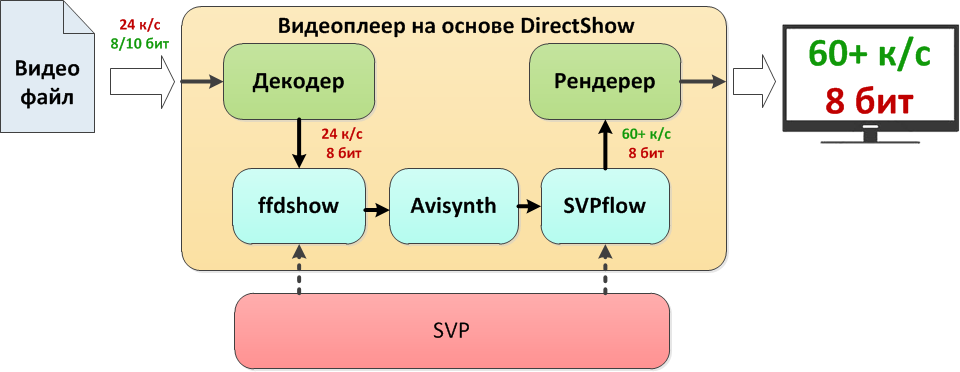
В текущей версии пакета SVP в качестве декодера видео используется LAV Filters, встроенный в плеер MPC-HC. Этот декодер поддерживает программное декодирование HEVC и аппаратное, если оно поддерживается железом.
ffdShow нужен только как фильтр, через который SVP получает доступ к кадрам, чтобы рассчитывать промежуточные.
https://www.svp-team.com/wiki/Manual:SVP/ru

https://www.svp-team.com/w/images/f/fb/2.png

865

(3 replies, posted in Using SVP)

1. What player are you using?
2. If it is MPC-HC then while vob-file playback select: menu Play - Filters - Copy filters list to clipboard - paste it here.

866

(6 replies, posted in Using SVP)

You can try do disable reset on seek:
Application settings - Additional options - Reset on seek - Don't reset

867

(6 replies, posted in Using SVP)

> reinstall of svp fixed it
good!

868

(6 replies, posted in Using SVP)

Check if you launch player or SVP with admin rights. Run it the same way from usual user.
https://www.svp-team.com/wiki/FAQ#Admin … eges_issue

869

(128 replies, posted in Using SVP)

> i can't see any difference between on and off state of svp in vlc
It is not normal. Look to SVP Event log. Do you see any error there?

SVP tray menu - Information - Events log

870

(128 replies, posted in Using SVP)

VLC menu Tools - Preferences - Input/Codecs tab - Hardware-accelerated decoding: Disable

You can select multiplier Movie x2 or Movie x3.
https://www.svp-team.com/wiki/Manual:FR … _a_Profile

872

(2 replies, posted in Using SVP)

> before updating my SVP
updating from what? or updating to what? smile

> has it caught up to the latest mvtools in quality yet?
What you mean? SVP uses SVPflow plugins. It is a deeply refactored and modified version of mvtools2 plugin.
SVPflow

> Can it do DCT?
It uses SAD and SATD. As I can remeber about DCT it was slow and it is not supported. Chainik can tell more.

> Are the halo artefacts gone?
They are still here but with default SVP settings they are not so noticeable. You can try and compare. As you know it depends on material and settings. Just try.
873

(128 replies, posted in Using SVP)

https://www.svp-team.com/wiki/File:Vlc-folder-permissions.png

See full description here: https://www.svp-team.com/wiki/SVP:VLC

Looks like you have 30 fps video maked from 24 fps by adding frame doubles. Check it frame by frame.

Also you can send bug report. It will give more information from logs.