2,601 (edited by Santr 14-05-2026 15:37:39)

Re: New RIFE filter - 3x faster AI interpolation possible in SVP!!!

AutumQueen92 wrote:

Anyone using 48fps or 72fps videos on a 120hz monitor? It seems to be smooth at times, and 120fps does not seem to have a big difference in comparison

If we're talking 24fps videos interpolated to 48 or 72, then yes, although mine is a 165Hz monitor. But x4 (96fps) is a noticeable step up from x3 (72fps) to my eye. More then that I can also notice but it's not as critical as getting to that x4.

One thing to note is that SVP is only half of the equation. The other half is to draw those frames in sync with your monitor, otherwise even 160fps will remain jittery.

Re: New RIFE filter - 3x faster AI interpolation possible in SVP!!!

Santr wrote:
AutumQueen92 wrote:

Anyone using 48fps or 72fps videos on a 120hz monitor? It seems to be smooth at times, and 120fps does not seem to have a big difference in comparison

If we're talking 24fps videos interpolated to 48 or 72, then yes, although mine is a 165Hz monitor. But x4 (96fps) is a noticeable step up from x3 (72fps) to my eye. More then that I can also notice but it's not as critical as getting to that x4.

One thing to note is that SVP is only half of the equation. The other half is to draw those frames in sync with your monitor, otherwise even 160fps will remain jittery.

Try 120hz if you can.  It uses a little more GPU resources with SVP but it is divisible by 48 and the added smoothness is worth it.

2,603 (edited by GeoFly 18-05-2026 23:16:36)

Re: New RIFE filter - 3x faster AI interpolation possible in SVP!!!

zxcvbnm821 wrote:
Chainik wrote:

> If the RIFE v2 models use fewer GPU resources and produce better visual quality than the v1 models

because they don't

Wait, what?! I always assumed v2 was strictly better than v1. Was I completely wrong?

The v2 models cause stutter for me. I get reduced GPU usage, however there is stutter in the playback without any dropped frames. When I switch back to the v1 models (e.g. 4.25_lite), the stutter goes away.

I've got a 4080 doing 4k from 23.976 fps to 48 Hz.

Re: New RIFE filter - 3x faster AI interpolation possible in SVP!!!

Panning lags without v sync only g sync is there a way to make everything as smooth as it is with v sync but without v sync with only g sync ?

2,605 (edited by Drakko01 22-07-2026 18:16:45)

Re: New RIFE filter - 3x faster AI interpolation possible in SVP!!!

I am having an issue trying to use the new VapourSynth R78 candidate release with SVP.Previously, when testing versions (like up to R77), I would simply replace the vapoursynth.dll file as usual, and everything worked perfectly. However, after doing the exact same thing with the new R78 DLL, my video player just  closes instantly whenever I try to open a video.If I revert back to the R77 DLL, the player works normal again.(any player)

I know that R78 introduced a breaking change or an API update that causes SVP or the player script to crash.
Does anyone know a way to make R78 work with SVP manually, and what exactly do I need to change? Is there another file or configuration I need to modify.

Thanks in advance for any help!

2,606

Re: New RIFE filter - 3x faster AI interpolation possible in SVP!!!

I have been using this setting to play all of my anime these days, its been great for me, but can it get any better?
Should I change my AI model to 4.26 Heavy?
Any suggestion?

Post's attachments

SVP.png, 59.24 kb, 550 x 603
SVP.png 59.24 kb, 8 downloads since 2026-07-31 

2,607

Re: New RIFE filter - 3x faster AI interpolation possible in SVP!!!

hvs wrote:

Should I change my AI model to 4.26 Heavy?

I'd suggest trying 4.22 Lite and 4.25 Heavy. Both are good quality-wise but while 4.25 Heavy is slightly better, it comes at a very high performance cost. 4.22 Lite has become my default.
With 4.26 models, I've experienced some pretty bad artifacts, so would not recommend. YMMV.

2,608 (edited by flowreen91 06-08-2026 06:19:40)

Re: New RIFE filter - 3x faster AI interpolation possible in SVP!!!

Can anyone check performance for latest TensorRT RTX?
They just fixed a crash that was happening at weird video sizes:
https://gyazo.com/bc40853110360394cd72264eea910699
+ it still has the benefit of building the rife engine faster than current TensorRT non-RTX so we should switch if looks like improvement...

Re: New RIFE filter - 3x faster AI interpolation possible in SVP!!!

Nevermind, asked Fable and it did some tests:

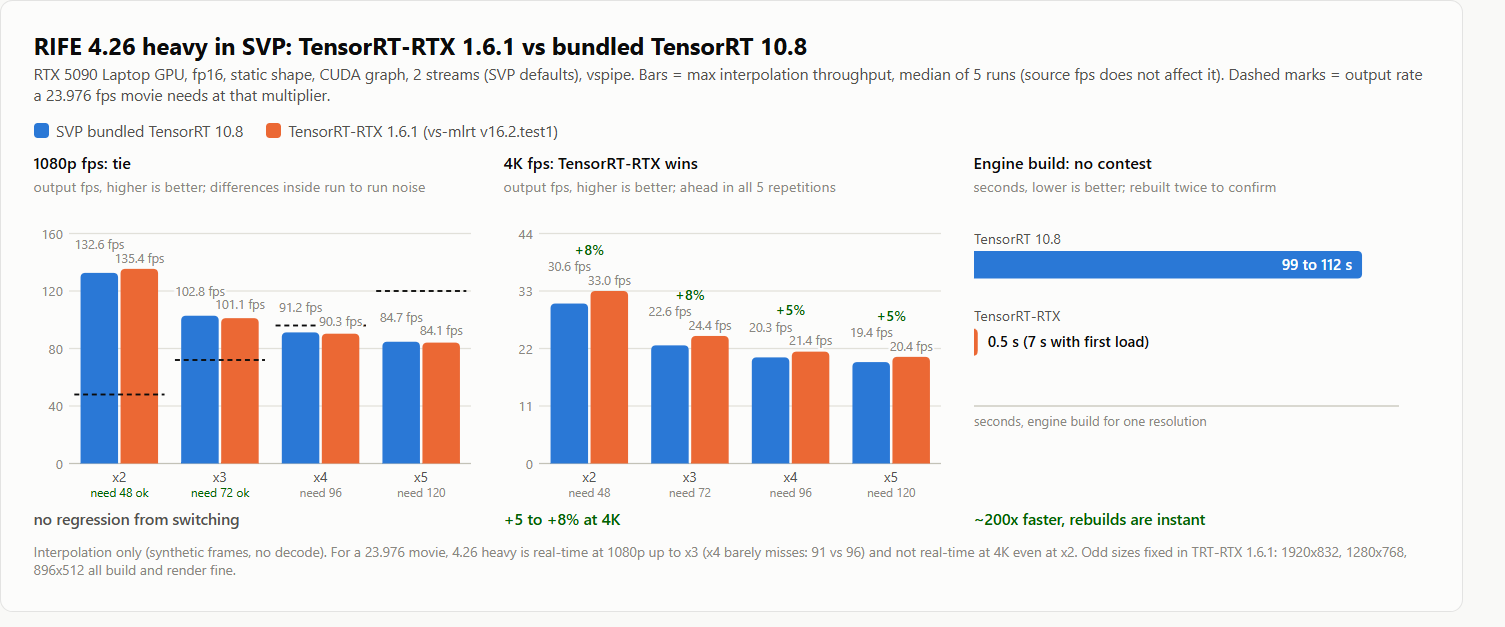
The setup: RTX 5090 Laptop GPU, SVP's bundled stack (TensorRT 10.8, vstrt.dll) vs TensorRT-RTX 1.6.1 (vs-mlrt v16.2.test1 vstrt_rtx.dll), RIFE 4.26 Heavy, fp16 + static shape + CUDA graph + 2 streams (SVP defaults), synthetic source through vspipe, so the numbers are max interpolation throughput and source fps does not change them. Numbers below are TensorRT vs TensorRT-RTX, median of 5 runs per config; the dashed marks in the chart show what a 23.976 movie needs at each multiplier:

https://i.gyazo.com/5ba59183e64e59e029c4a87da7c25899.png

1080p (1920x1088): x2 132.6 vs 135.4, x3 102.8 vs 101.1, x4 91.2 vs 90.3, x5 84.7 vs 84.1. Identical within run to run noise.
4K (3840x2176): x2 30.6 vs 33.0, x3 22.6 vs 24.4, x4 20.3 vs 21.4, x5 19.4 vs 20.4. TensorRT-RTX is 5-8% faster and won every single repetition.
For a 23.976 movie that means 4.26 Heavy is real-time at 1080p up to x3 (x4 barely misses, 91 vs 96 needed) and not real-time at 4K even at x2.

Engine build for 4.26 Heavy: 99 to 112 seconds on TensorRT 10.8 vs 0.5 seconds on TensorRT-RTX (about 7 seconds total setup including first engine load). Rebuilt engines from scratch twice per backend to confirm, it holds.

Also confirmed the weird-size crash is really fixed in 1.6.1: 1920x832, 1280x768 and 896x512 all build and render fine.

So: same speed at 1080p, faster at 4K, and the 100 second engine build basically disappears. Looks like a clear win. SVP's script generator already has the rife_rtx hook that loads vstrt_rtx.dll, it just needs the updated rife package (vstrt_rtx.dll + tensorrt_rtx DLLs + newer vsmlrt.py).

2,610

Re: New RIFE filter - 3x faster AI interpolation possible in SVP!!!

Drakko01 wrote:

I am having an issue trying to use the new VapourSynth R78 candidate release with SVP.Previously, when testing versions (like up to R77), I would simply replace the vapoursynth.dll file as usual, and everything worked perfectly. However, after doing the exact same thing with the new R78 DLL, my video player just  closes instantly whenever I try to open a video.If I revert back to the R77 DLL, the player works normal again.(any player)

I know that R78 introduced a breaking change or an API update that causes SVP or the player script to crash.
Does anyone know a way to make R78 work with SVP manually, and what exactly do I need to change? Is there another file or configuration I need to modify.

Thanks in advance for any help!

I previously submitted this , but it has been completely ignored.It seems like nobody cares about this or sees any value in it.