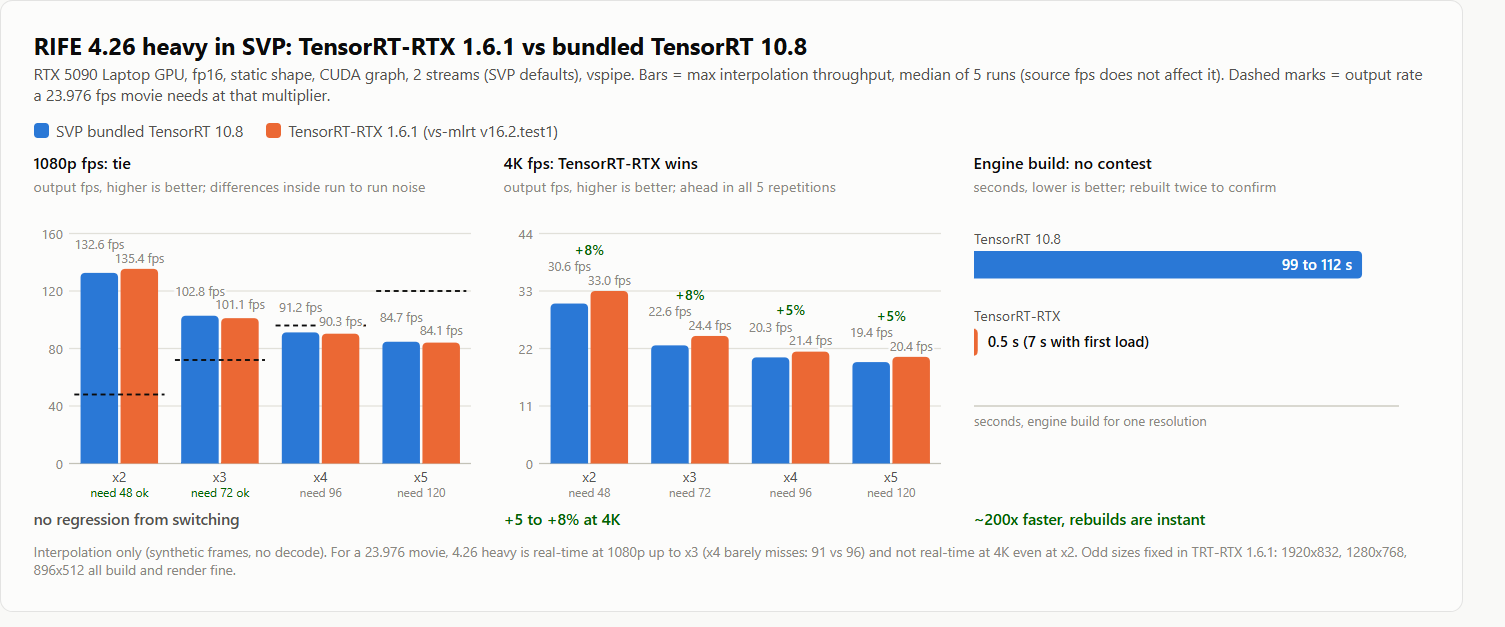
Chainik wrote:is it possible that 5090 is not a bottleneck in your case?
what is the GPU load?
GPU load is 98%. I attached the benchmark I use (svp-rife-bench.zip), so you can
run the same test. It only needs an SVP 4 install: it uses SVP's own VSPipe and
a synthetic clip, so no video file, decoder or display is involved. The GPU is
the only thing working, and numbers are comparable between machines. Unpack, run
run_svp_rife_bench.cmd, details are in the README.
My numbers from that test (5090)
max output fps at x2, 2 GPU threads, best of 3 runs (a 24 fps video at x2 only
needs 48):
resolution  model     TensorRT   TensorRT-RTX   RTX vs TRT
1080p       4.6         312.8       312.5         same
1080p       4.6 v2      330.7       349.1         +5.6%
4K          4.6          71.9        74.8         +4.0%
4K          4.6 v2       77.6        83.6         +7.7%
v2 is also faster than v1: 6 to 8% on TensorRT, about 12% on TensorRT-RTX.
Archive updated: v2 models now work
https://drive.google.com/drive/folders/ … XX-S2JMOXD
The archive is updated to support the v2 models. That fixes the crash pituz hit.
Please re-download before testing. The v2 models are the "(v2)" entries in the
"AI model" list, for example "4.6 (v2)", and they show up there once their files
are in rife\models\rife_v2.
I also did what you suggested: generate.js is no longer patched. TensorRT-RTX is
now switched on with a "rife_rtx" user defined option. How to enable it:
1. Close SVP and any player, back up the SVP 4 folder.
2. Copy the "SVP 4" folder from the archive over "C:\Program Files (x86)\SVP 4"
(needs admin rights once).
3. Start SVP, then main menu -> Application settings -> "User defined options"
tab, fill in the fields below and press "Add option".
Title:          TensorRT-RTX   (any text, it is just the label)
Script name:    rife_rtx       (this exact name matters)
Option scope:   FRC profile
Allowed values: ON or OFF
4. Open your RIFE profile. At the bottom there is now a "User defined options"
section with a "TensorRT-RTX" row: set it to On. "Neural network engine" must
still be "NVIDIA TensorRT".
5. Play a video.
The second attachment is a screenshot of both places: the option being added on
the right, and the "TensorRT-RTX" row set to On in the profile on the left.
Off is the default and gives exactly stock SVP behaviour, so the option is safe
to leave in place.
What I bumped into: v2 models gave corrupted frames on TensorRT-RTX
Every interpolated frame had a checkerboard of blown pixels over the whole
picture. A speed test cannot show this, I only saw it when I compared the output
frames. I should have checked sooner.
What breaks:
* v2 model + TensorRT-RTX 1.6.1: corrupted
* v2 model + plain TensorRT: fine
* v1 model + either backend: fine
Why: the v2 models compute their warp grid from the tensor shape at runtime
(ops: Shape, Gather, Range, Expand, Where, Equal, ConstantOfShape). TensorRT-RTX
1.6.1 miscompiles that part of the graph. The v1 models do not have those ops.
It is not a precision problem: a pure fp32 engine shows the same corruption, and
the same fp16 graph is correct on plain TensorRT.
Fix (in the updated archive): constant-fold that part of the graph for the
padded resolution before building the engine. After that, TensorRT-RTX and
TensorRT output is bit identical. Folding takes 0.3 s, once per model and
resolution. The engine is already cached per resolution, so the folded model
sits next to it.