Re: Howto: play BD3D with SVP using MPC-BE or Daum PotPlayer

Chainik wrote:
Chainik wrote:

(though it's not good cause it wants to run as admin, and then it won't work with SVP unless you run SVP as admin too...)

Sorry I missed that smile I'm sure that will fix it! Thanks!

77 (edited by narkohol 29-07-2025 02:25:09)

Re: Howto: play BD3D with SVP using MPC-BE or Daum PotPlayer

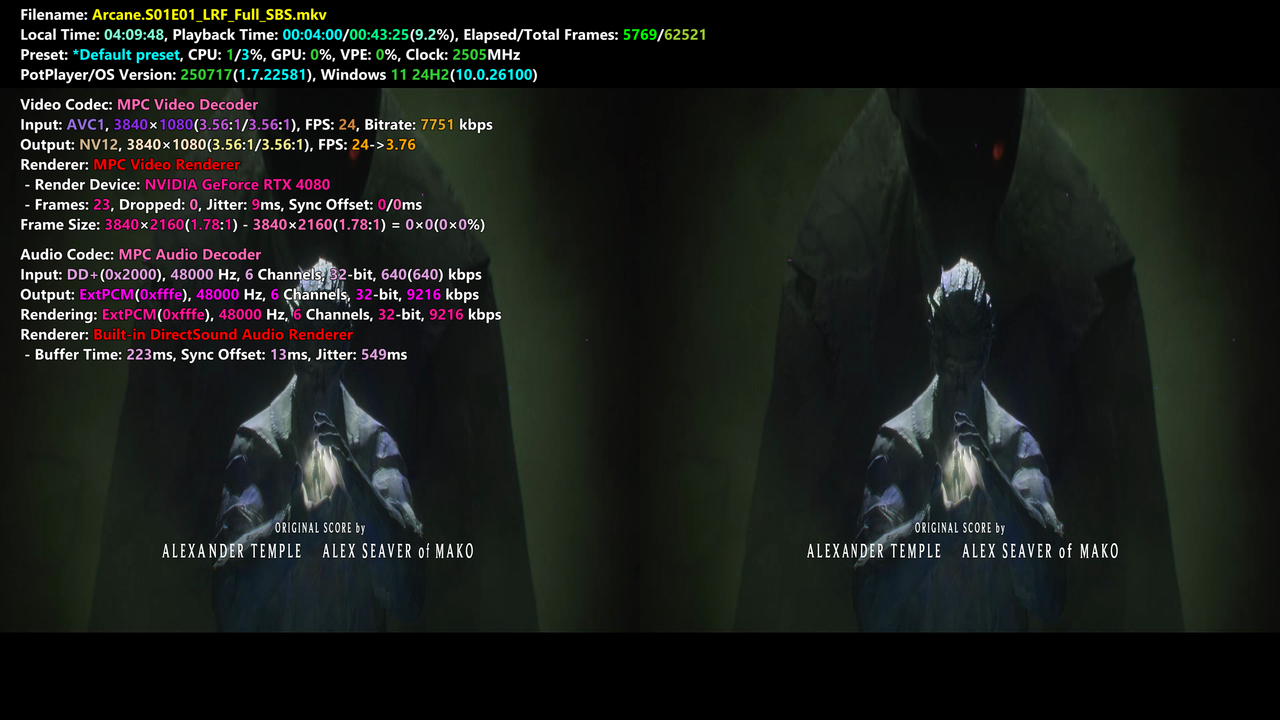
I'm trying to use SVP on a FullSBS video (3840x1080) that I output to a 3840x2160 display mode and looks like this in PotPlayer (using 'Stretch'):

https://i.postimg.cc/66GtSBmq/image.png

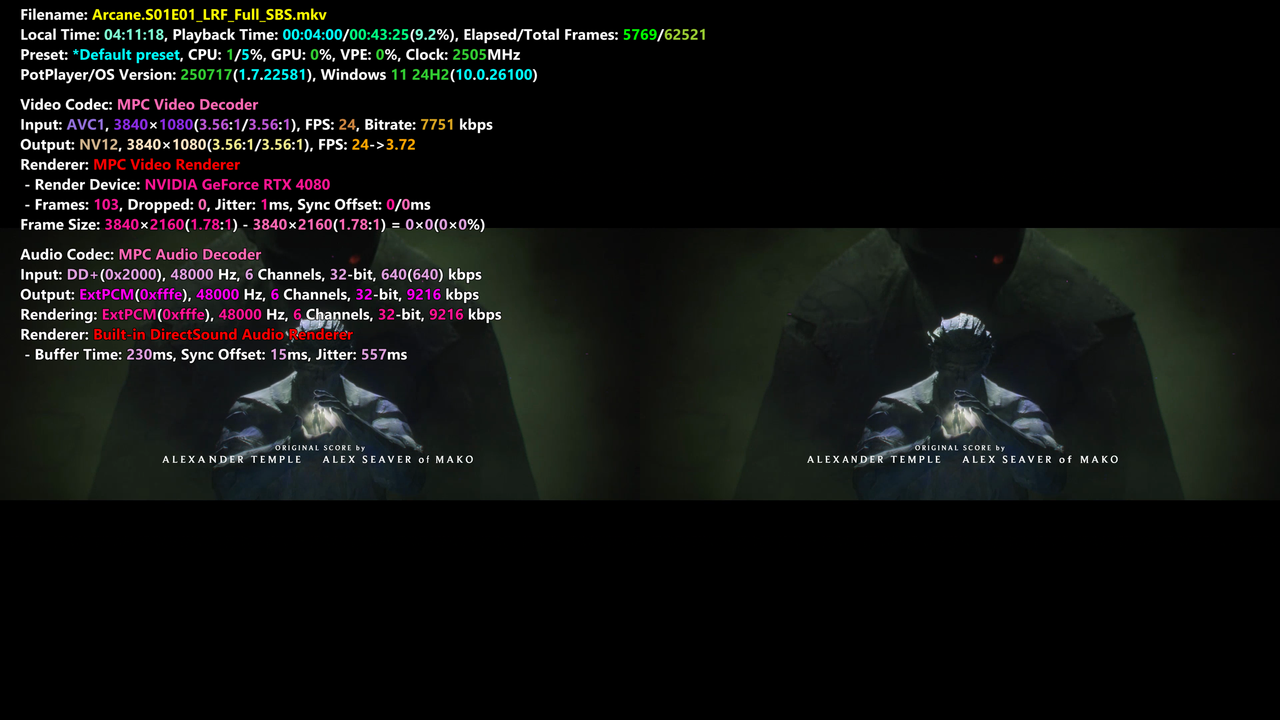
But when I enable SVP RIFE the aspect ratio gets wrongly changed to this:
https://i.postimg.cc/htMBxvfy/image.png

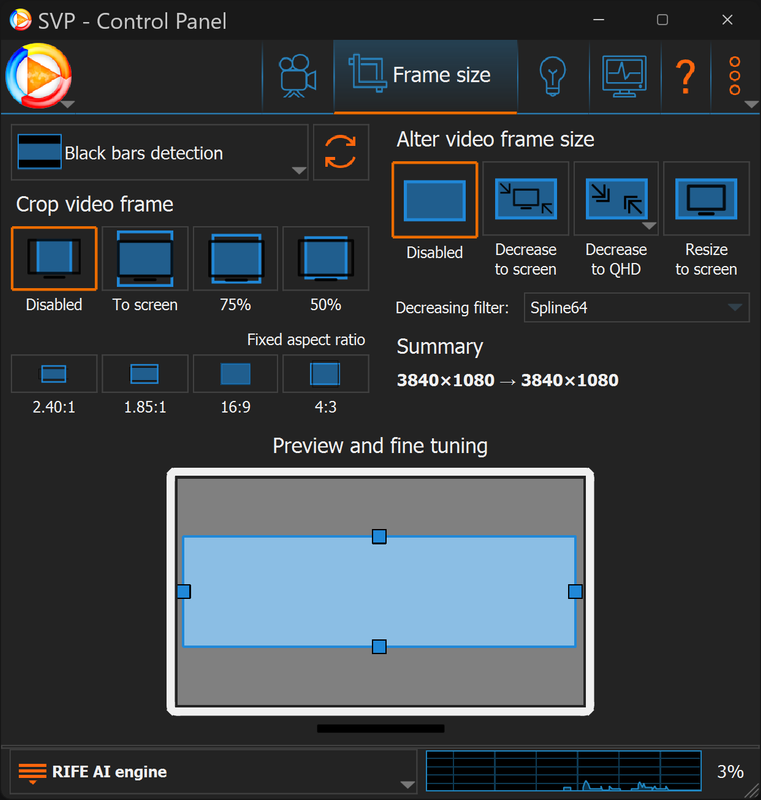
Despite having 'Crop video frame' and 'Alter video frame size' disabled:
https://i.postimg.cc/KjnXYv65/image.png

How can I make SVP stop altering the aspect ratio?

78 (edited by narkohol 29-07-2025 02:34:27)

Re: Howto: play BD3D with SVP using MPC-BE or Daum PotPlayer

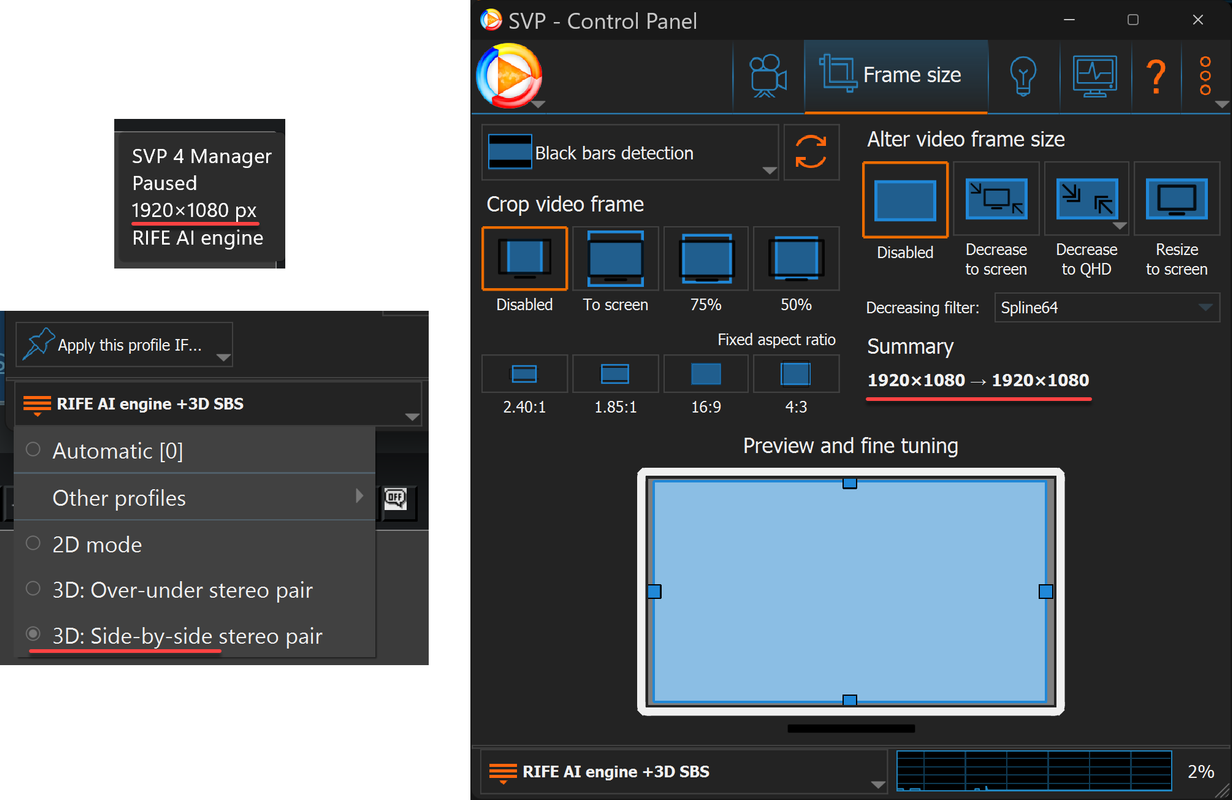
When I activate the '3D SBS option' then it looks fine, but the resolution reported is 1920x1080:

https://i.postimg.cc/T1m9MKzT/image.png

Is this correct?  is it reporting the resolution per eye instead the full resolution of the video file?

Re: Howto: play BD3D with SVP using MPC-BE or Daum PotPlayer

narkohol wrote:

When I activate the '3D SBS option' then it looks fine, but the resolution reported is 1920x1080:

...

Is this correct?  is it reporting the resolution per eye instead the full resolution of the video file?


I had a similar issue where it would squish it vertically by 2x (but not related to SVP) just the broken 3d implementation in PotPlayer.
The fix for me was to bind a keyboard shortcut to "3D -> Fullscreen" (not the normal fullscreen shortcut).
Then enter fullscreen video mode first (and the size gets squished in half vertically), then hit your bound keyboard shortcut 2-3 times until it stretches back to the proper vertical resolution (in my case this was normal aspect ratio, for you it will probably be 2x vertical stretched).
I don't know if this will work for you, but it seems like it might be the same issue, although my PotPlayer didnt need SVP to have this issue it has always had this issue.

Re: Howto: play BD3D with SVP using MPC-BE or Daum PotPlayer

r75cq wrote:

I don't know if this will work for you, but it seems like it might be the same issue, although my PotPlayer didnt need SVP to have this issue it has always had this issue.

In my case it is SVP. It happens the moment SVP gets enabled, and it goes back to normal if I close it.

Forcing the SBS mode seems to work, but SVP reporting a '1920x1080' resolution is what was worrying me. I guess it is counting just per eye? because if not there should be a noticeable difference when enabling/disabling it, and I don't see it...

Re: Howto: play BD3D with SVP using MPC-BE or Daum PotPlayer

narkohol wrote:
r75cq wrote:

I don't know if this will work for you, but it seems like it might be the same issue, although my PotPlayer didnt need SVP to have this issue it has always had this issue.

In my case it is SVP. It happens the moment SVP gets enabled, and it goes back to normal if I close it.

Forcing the SBS mode seems to work, but SVP reporting a '1920x1080' resolution is what was worrying me. I guess it is counting just per eye? because if not there should be a noticeable difference when enabling/disabling it, and I don't see it...


Mine reports 1920x1080 as well, I think it's just per eye as you say.

Re: Howto: play BD3D with SVP using MPC-BE or Daum PotPlayer

r75cq wrote:
narkohol wrote:
r75cq wrote:

I don't know if this will work for you, but it seems like it might be the same issue, although my PotPlayer didnt need SVP to have this issue it has always had this issue.

In my case it is SVP. It happens the moment SVP gets enabled, and it goes back to normal if I close it.

Forcing the SBS mode seems to work, but SVP reporting a '1920x1080' resolution is what was worrying me. I guess it is counting just per eye? because if not there should be a noticeable difference when enabling/disabling it, and I don't see it...


Mine reports 1920x1080 as well, I think it's just per eye as you say.

Yes I've noticed that. If you look in the scaling page,  even if it is set to downscale to QHD it still reports FHD 1920x1080 then says "Scaling: none"

83 (edited by pauzel 26-04-2026 12:49:26)

Re: Howto: play BD3D with SVP using MPC-BE or Daum PotPlayer

In case it is useful for sb, I added (let Codex/GPT 5.5 add) full res SBS view mode to MPC-BE: https://github.com/pauzel/MPC-BE/pull/1/changes. Seems to work fine. I also can provide my build of the installer if sb needs it. I needed it since Virtual Desktop for VR does not support other formats provided by MPC-BE.

Re: Howto: play BD3D with SVP using MPC-BE or Daum PotPlayer

pauzel wrote:

In case it is useful for sb, I added (let Codex/GPT 5.5 add) full res SBS view mode to MPC-BE: https://github.com/pauzel/MPC-BE/pull/1/changes. Seems to work fine. I also can provide my build of the installer if sb needs it. I needed it since Virtual Desktop for VR does not support other formats provided by MPC-BE.

Not true. VD supports over/under which is how I was using MPC-BE with VD for years. I've moved on, but it's a good idea to have full SBS support smile

Re: Howto: play BD3D with SVP using MPC-BE or Daum PotPlayer

dawkinscm wrote:
pauzel wrote:

In case it is useful for sb, I added (let Codex/GPT 5.5 add) full res SBS view mode to MPC-BE: https://github.com/pauzel/MPC-BE/pull/1/changes. Seems to work fine. I also can provide my build of the installer if sb needs it. I needed it since Virtual Desktop for VR does not support other formats provided by MPC-BE.

Not true. VD supports over/under which is how I was using MPC-BE with VD for years. I've moved on, but it's a good idea to have full SBS support smile

VD only supports half res over under, not full res. I am not sure if frame interpolation plays well with the anisotropic distortion from half res, also SVP has no half res over under 3D mode. But maybe it still works fine, have not looked into it too much.

Re: Howto: play BD3D with SVP using MPC-BE or Daum PotPlayer

pauzel wrote:
dawkinscm wrote:
pauzel wrote:

In case it is useful for sb, I added (let Codex/GPT 5.5 add) full res SBS view mode to MPC-BE: https://github.com/pauzel/MPC-BE/pull/1/changes. Seems to work fine. I also can provide my build of the installer if sb needs it. I needed it since Virtual Desktop for VR does not support other formats provided by MPC-BE.

Not true. VD supports over/under which is how I was using MPC-BE with VD for years. I've moved on, but it's a good idea to have full SBS support smile

VD only supports half res over under, not full res. I am not sure if frame interpolation plays well with the anisotropic distortion from half res, also SVP has no half res over under 3D mode. But maybe it still works fine, have not looked into it too much.

Again. Not true.

Post's attachments

Screenshot 2026-04-26 at 20.16.31.png, 108.43 kb, 519 x 233
Screenshot 2026-04-26 at 20.16.31.png 108.43 kb, 1 downloads since 2026-04-26 

Re: Howto: play BD3D with SVP using MPC-BE or Daum PotPlayer

dawkinscm wrote:
pauzel wrote:
dawkinscm wrote:

Not true. VD supports over/under which is how I was using MPC-BE with VD for years. I've moved on, but it's a good idea to have full SBS support smile

VD only supports half res over under, not full res. I am not sure if frame interpolation plays well with the anisotropic distortion from half res, also SVP has no half res over under 3D mode. But maybe it still works fine, have not looked into it too much.

Again. Not true.

Maybe actually read what I write before calling it BS? I did not say anything about MPC-BE not supporting full res over under, I said VD is not supporting it. Anyhow, nobody forces you to use my change, and frankly I will refrain from providing any more of my code changes if as a response I get a bunch of passive agressive nitpicks.

88 (edited by dawkinscm 26-04-2026 21:49:26)

Re: Howto: play BD3D with SVP using MPC-BE or Daum PotPlayer

pauzel wrote:
dawkinscm wrote:
pauzel wrote:

VD only supports half res over under, not full res. I am not sure if frame interpolation plays well with the anisotropic distortion from half res, also SVP has no half res over under 3D mode. But maybe it still works fine, have not looked into it too much.

Again. Not true.

Maybe actually read what I write before calling it BS? I did not say anything about MPC-BE not supporting full res over under, I said VD is not supporting it. Anyhow, nobody forces you to use my change, and frankly I will refrain from providing any more of my code changes if as a response I get a bunch of passive agressive nitpicks.

What I said which is that "it's a good idea to have full SBS support" followed by a smile emoticon of support for your idea.  This was a mistake on my part because I used VD with full over/under for years and didn't see a difference in resolution in my visor. I put my evidence in front of you and you pointed out the error. You should have left it at that. Anyway I'm out. Have fun.

Re: Howto: play BD3D with SVP using MPC-BE or Daum PotPlayer

pauzel wrote:

In case it is useful for sb, I added (let Codex/GPT 5.5 add) full res SBS view mode to MPC-BE: https://github.com/pauzel/MPC-BE/pull/1/changes. Seems to work fine. I also can provide my build of the installer if sb needs it. I needed it since Virtual Desktop for VR does not support other formats provided by MPC-BE.

It's nice to see AI models being able to improve existing apps with minimal knowledge. If you ever find some new features/fixes, please share them. Just add a clear explanation so it's description is easily searchable.
Good job!

Re: Howto: play BD3D with SVP using MPC-BE or Daum PotPlayer

dawkinscm wrote:
pauzel wrote:
dawkinscm wrote:

Again. Not true.

Maybe actually read what I write before calling it BS? I did not say anything about MPC-BE not supporting full res over under, I said VD is not supporting it. Anyhow, nobody forces you to use my change, and frankly I will refrain from providing any more of my code changes if as a response I get a bunch of passive agressive nitpicks.

What I said which is that "it's a good idea to have full SBS support" followed by a smile emoticon of support for your idea.  This was a mistake on my part because I used VD with full over/under for years and didn't see a difference in resolution in my visor. I put my evidence in front of you and you pointed out the error. You should have left it at that. Anyway I'm out. Have fun.

Fair enough, maybe I took it the wrong way. No hard feelings. Maybe you used VD for desktop, I have no experience with that, I am talking about VD for Mobile/Quest, which only has half over under mode.

Re: Howto: play BD3D with SVP using MPC-BE or Daum PotPlayer

flowreen91 wrote:
pauzel wrote:

In case it is useful for sb, I added (let Codex/GPT 5.5 add) full res SBS view mode to MPC-BE: https://github.com/pauzel/MPC-BE/pull/1/changes. Seems to work fine. I also can provide my build of the installer if sb needs it. I needed it since Virtual Desktop for VR does not support other formats provided by MPC-BE.

It's nice to see AI models being able to improve existing apps with minimal knowledge. If you ever find some new features/fixes, please share them. Just add a clear explanation so it's description is easily searchable.
Good job!

Thanks, yes, AI coding agents have become very capable, as long as you can clearly describe what you want chances are high it will one shot it for you, as was the case here. Mostly the challenge is getting the original code to compile.