кажись, вы друзья 
SVPlayer for 🍎 iPhone | iPad | Apple TV and 🤖 Android | Android TV
SVP 4 for Windows | macOS | Linux: 30 days FREE TRIAL.
Read FAQ & follow SVP @ Facebook
You are not logged in. Please login or register.
SmoothVideo Project → Posts by Chainik
кажись, вы друзья
вдруг кто-то не понимает, что в этом случае все-равно унутрь SVP поступают 8-бит, и из него наружу выходят 8-бит, которые потом на кой-то хрен преобразовываются в 10-бит
и чего? фильтры (включая vapoursynth) все-равно строго 8-битные
я то подумал вдруг допилили...
> нет никаких проблем вывести p010 после svp на рендеры (evrcp, d3d9/11, madvr)
погодьте! (с) это как?
which 82-inch tv doesn't have motion interpolation built-in?
> если крутилка стоит на одном месте, а я переключаю только ускорение GPU, то при этом SVP работает с разными настройками?
с разными
в логе написана цифра, чем меньше цифра, тем круче настройки
> 20:46:03.286 []: Profile: using auto values [4]
если крутилку "c gpu" выкрутить вниз так, что цифра получится такая же, как "без cpu" - вот тут и будут одинаковые настройки
===
но если нагрузка на CPU в пределах 70%, то скорее это всё значит что видяха не справляется. возможно, слишком тяжелые настройки у рендера в mpv
"совсем плохо" и "не совсем плохо" у каждого свои
SVP выбирает разные настройки с и без "ускорения GPU", если выбирается не адекватно реальной скорости железа, то есть крутилка "скорость - качество"
ok turning of 10bit allowed me to play 1 step over lowest quality.
But doesnt that remove alot of hdr colorspace?
mpv does hdr tone mapping in all cases
> still too chopy even at lowest settings as my cpu hits 100%
btw, turn off "output it 10bit color depth"
> I have to get a ryzen 7 I guess
i7-8700 or later must be good too 
> do all turing cards peform the same in svp?
in theory - yes
> gives more flexibility for special cases
just another way to trade smoothness for quality (i.e. leave even more original frames in "bad" scenes)
it doesn't change quality of computed intermediate frames
8-cores Ryzen is good 
Or you can go for the full HW acceleration on Turing cards
Also ensure you're using SVP's build of mpv cause it contains 4K performance patch.
"fixed" modes - uniform, 1m, 1m50, 2m
"adaptive" switches between (some of) them in each frame by using "motion vectors quality" metric
default behavior is: "good vectors" -> uniform, "bad vectors" -> 1m, "very bad vectors" -> 1m50
> Вообще не про свп, но "обычныйадмин" не только несовершенен, но и любую критику/попытки указать, как реально бы лучше, вштыки воспринимает
Вообще не про тебя , но "обычныйкритик" как правило не первый, и даже не десятый. Это для себя он первый и самый умный, а "обычныйадмин" за годы работы таких видел уже гораздо больше, чем хотел бы.
> но по мне, хз кому интересно заниматься конвертацией видео
а вот тем не менее!
просто прими, что ты много чего не понимаешь
> который до сих пор тестинг
потому что по факту нафиг никому не надо, т.к. никаких преимуществ не дает, а ограничения имеет
There's no "public" API for this, however SVPcast's WebUI works through simple REST+json protocol, you can easily see it via Chrome's dev tools.
> Но ведь это просто картинка со стрелками
Ага, конечно, именно так обычно все и делают, рисуют ничего не значащие просто-картинки-со-стрелками.
На самом деле это тайное знание.
Но, в 3-й раз, к теме это отношения не имеет.
===
Да, добавление по теме: на ноуте с i5-7200U, 4К+SVP работать, конечно, не может. Оно работает только потому, что наверняка включен ресайз до размера экрана, который 1080p, а то и меньше.
Да вообще тут не при чем наличие или отсутствие DirectShow.
DXVA2 copy-back + 60 fps 4K + вообще_убрать_ffdshow - тоже тормозит?
Может это ноут с одной планкой памяти, например.
> уплавление через движок SVP работает без ffdshow и вроде даже без DXVA2 Copy-Back
оно в принципе не может работать без "copy-back"
а про работу без ffdshow даже в мануале в картинках есть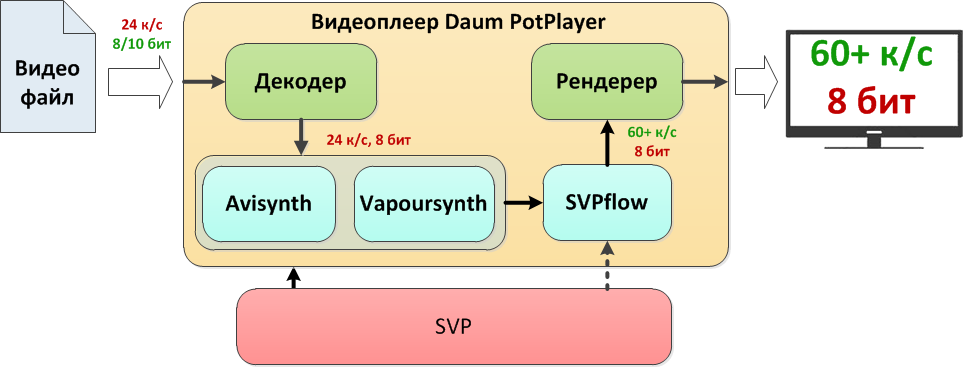
но опять же, см. п.1 - дело НЕ в ffdshow
для "живого" обсуждения "любых тем" пройдите в специально отведенные места
для справки: "платные" юзеры предпочитают задавать вопросы в индивидуальном порядке, а не на форуме
если это намек на кучу тем ниже, то - "школьники" отвыкли думать сами, предпочитая закидывать сотней <тупых> вопросов
я лично не горю желанием проводить ликбезы, вся необходимая информация давно написана и обсосана со всех сторон, поэтому я лично и не отвечаю
если это кажется "надменностью" - ну извините, но по другому не будет
RTFM
> 26 <..> Подростки деградируют, Они разучились предложения строить
а теперь попробуй мысленно представить, какая боль у человека 36 лет
а вас таки уверяю, шоб все так в ноги стреляли
> Так писать даже забавно
ну напиши так чтоб все чОтко было, прямо как в 2к19 (тьфу блин) положено!
причем по-английски
если понравится - получишь денег
James D
Модель <...> действительно единственно выгодная для разработчика
Такое ощущение, что вы таки переживаете что мы получаем мало денег. Не надо так переживать!
ладно, ок, зачморил
SmoothVideo Project → Posts by Chainik
Powered by PunBB, supported by Informer Technologies, Inc.